![Knowledge Centerx2-1.png]](https://knowledge.buzzbid.com/hs-fs/hubfs/Knowledge%20Centerx2-1.png?height=50&name=Knowledge%20Centerx2-1.png)
On Checkout Page 2
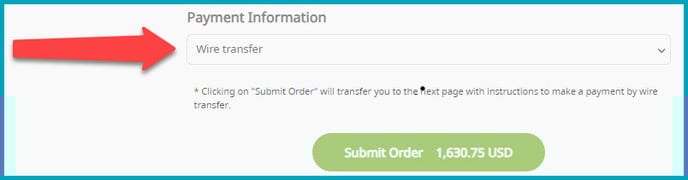
- In the "Payment Information" selection, choose "Wire Transfer".
- Click "Submit Order.
Next Screen with Instructions
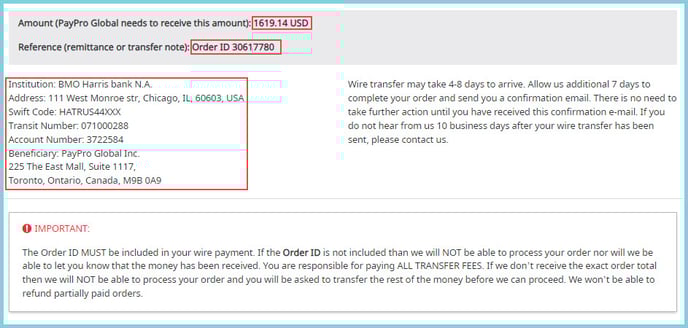
- Note the Amount to pay.
- Note the Referenced Order ID number.
- Wire Transfer the amount using the provided wiring instructions.
- Or if you're mailing a check, send it to:
PayPro Global Inc
225 The East Mall, Suite 1117
Toronto, Ontario, CA M9B OA9
Next Steps
- Your transaction will be in a "Waiting" status until the payment is processed.
- When processed, you'll receive a Payment Confirmation Email from PayPro Global.
- Your BuzzBID Subscription will be processed as normal, and you'll receive a notification with instructions for using your new Subscription.
If needed, here is a PayPro Global W-9 Taxpayer Identification Number & Certification for your Accounts Payable vendor setup.