![Knowledge Centerx2-1.png]](https://knowledge.buzzbid.com/hs-fs/hubfs/Knowledge%20Centerx2-1.png?height=50&name=Knowledge%20Centerx2-1.png)
Applies To: BuzzBID Standard, Advanced, and FireShield™. This guide helps customers and IT teams compare four common BuzzBID deployment environments. Review final architecture, security, backup, licensing, and hosting requirements with your IT provider and the BuzzBID team.
Choose the Environment That Fits How Your Team Works
The best BuzzBID environment depends on how many people use BuzzBID, whether they need to work in shared projects, where the database and Plans folders should be hosted, and who will manage the supporting infrastructure.
This guide compares four common approaches. The diagrams show only the core application, database, storage, and access relationships.
Quick Comparison
| Environment | Best For | Access | Infrastructure |
| Independent PC | Independent users who do not need continuous shared-project access | Local PC; optional Windows Remote Desktop | Managed on each user’s PC |
| Multi-User — On-Premises | Teams that need shared projects and want customer-controlled local hosting | Office PCs; optional Windows Remote Desktop | Customer-managed servers |
| Multi-User — Azure Hosted | Distributed teams that prefer a Microsoft Azure environment | Azure Virtual Desktop or RemoteApp | Customer or IT-provider-managed Azure resources |
| Multi-User — LoadSpring Hosted | Teams that want a hosted multi-user environment with Citrix access | Citrix | LoadSpring-hosted environment |
Option 1: Independent PC Environment
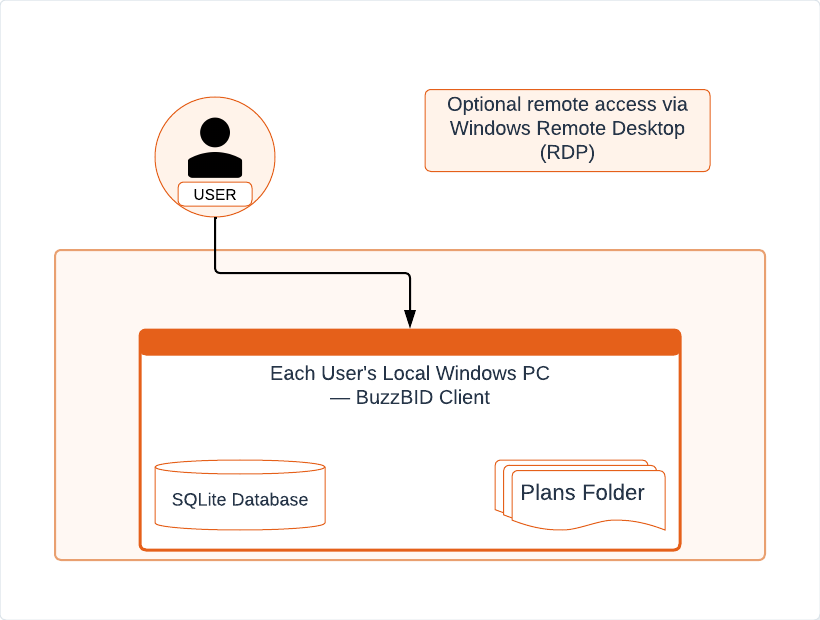
Each user runs the BuzzBID client on a local Windows PC. The SQLite database and Plans folder are stored with that user’s local installation. Optional remote access can be provided through Windows Remote Desktop (RDP).
Best fit when:
- A centralized view of every project is not required.
- Users share selected projects rather than collaborate continuously in the same environment.
- A dedicated SQL Server environment would add unnecessary cost and administration.
- Each user or location can manage its own PC, data, and backups.
Option 2: Multi-User — On-Premises
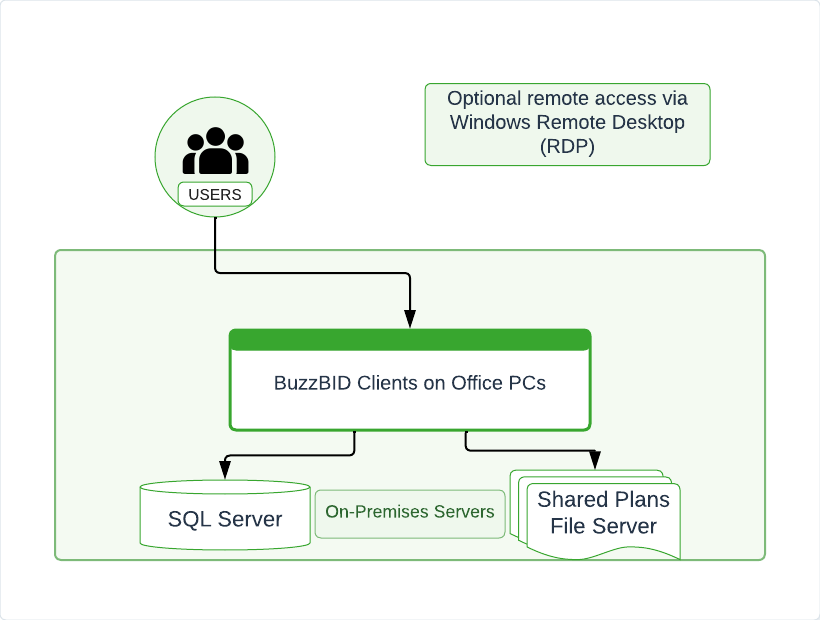
BuzzBID clients run on office PCs and connect to a shared SQL Server database and shared Plans file server located in the customer’s on-premises environment. Optional remote access can be provided through Windows Remote Desktop (RDP).
Best fit when:
- Multiple users regularly collaborate on shared projects.
- Centralized visibility across user projects is required.
- Your organization wants to keep data and infrastructure on-site.
- Internal IT resources can manage SQL Server, shared storage, security, remote access, and backups.
Option 3: Multi-User — Azure Hosted
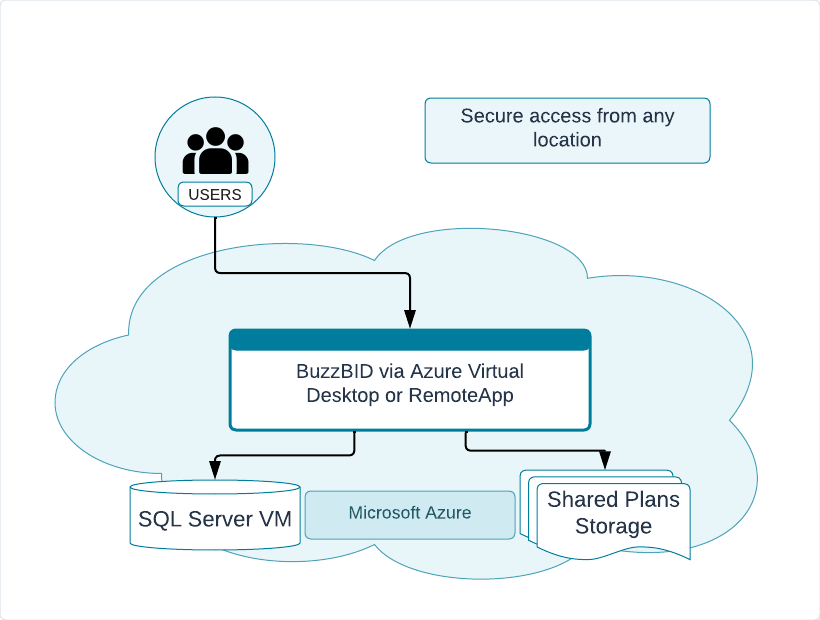
Users securely access BuzzBID through Azure Virtual Desktop or RemoteApp. The multi-user environment uses a SQL Server virtual machine and shared Plans storage in Microsoft Azure.
Best fit when:
- Multiple users regularly collaborate on shared projects.
- Users in different locations need consistent remote access.
- An Azure environment already exists or cloud-based administration is preferred.
- Your organization or IT provider can manage Azure resources, security, storage, SQL Server, and backups.
Option 4: Multi-User — LoadSpring Hosted
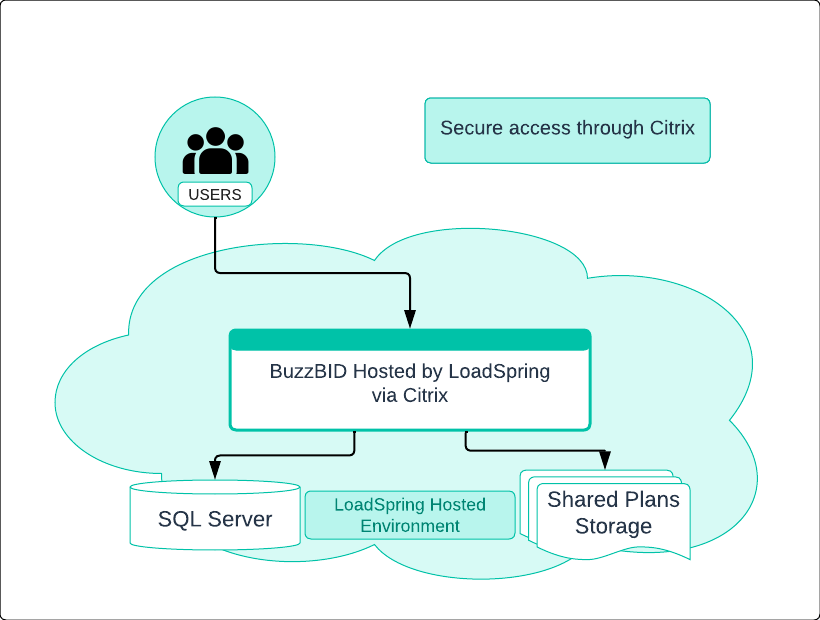
Users access BuzzBID through Citrix while the application, SQL Server, and shared Plans storage are hosted in the LoadSpring environment.
Best fit when:
- Multiple users need a shared, centralized BuzzBID environment.
- Secure Citrix access matches your organization’s workflow.
- Your team prefers a hosted environment instead of maintaining the full server stack internally.
- Hosting responsibilities, backups, security, access, and support boundaries are confirmed with the providers involved.
How to Narrow the Choice
- Choose Independent PC when users mainly work independently and only share selected projects.
- Choose On-Premises when centralized collaboration is required and your organization wants direct control of local infrastructure.
- Choose Azure Hosted when your team needs secure multi-location access and already uses or prefers Microsoft Azure.
- Choose LoadSpring Hosted when your team wants a turn-key, fully hosted, fully managed, multi-user environment delivered through Citrix by LoadSpring.
BuzzBID Recommendation: Maintain verified, regularly tested backups of every Plans folder and database, regardless of the environment selected. Confirm who is responsible for backups and recovery before the environment goes into production.
Need Help?
If you are unsure which environment best fits your organization, contact the BuzzBID Support team. We can help you review the number and location of users, collaboration needs, existing infrastructure, remote-access requirements, and hosting preferences before you choose a deployment approach.